A Contractor Passport is a NeXafe module activated a contracting company to used to upload and store their corporate compliance information and documents. You need to activate a collaboration with a contractor to be able to assign requirements and access the corresponding documents placed in the contractor’s Passport.
Left menu: Contractors ⇒ Top sub-menu: Passports
- Click on the +Contractor blue button.
- Find the contractor in the list and click the + blue button in front of the company name.
- You can invite multiple companies at once by checking their selection box and clicking on the +Selection button once done.
- The Passport will now be in your Passport table with an active collaboration ready to be added to a project and/or assigned requirements (see how below).
- The contractor is notified of the new collaboration.
If the Company is not in the list
- If you can’t find the company in the list, click the Invite blue button to open the invitation window.
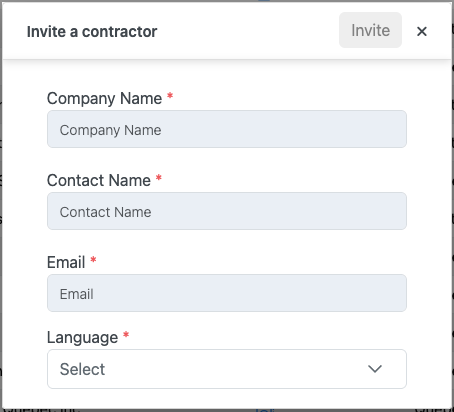
- Fill the information
- The person must be the one that will be managing the Passport at the contractor company.
- Click Invite to send your invitation.
- The person will receive your invitation to collaborate on NeXafe with a link to activate their Passport.
- Your invitation will be added to your External Invitations list (blue button at the top right corner of your Passport table).
- Once the contractor has activated its Passport, it will automatically be added to your Passport list and ready to be added to a project or assigned requirements.
💡 Good to know
- We recommend that you contact contractors not in the list to inform them that you use NeXafe and that they will receive a system invitation (you can validate the contact information at the same time).
- It is also a good idea to formalize your use of NeXafe in your tendering documentation and communication (contractors must have their NeXafe Passport to contract with us…).
Download NeXafe’s Affiliated Collaborator logo
Related Topics